

Table of Content
- Why Your Business Isn't Showing on Google Maps
- How Google Decides Which Businesses Appear on Maps
- Reasons Your Business Is Not Showing on Google Maps
- Your Google Maps Recovery Checklist
- Dubai-Specific Local SEO Tips
- How to Rank Higher in the Local Pack Once You're Visible
- When to Get Professional Help
- Frequently Asked Questions
- Conclusion
Quick Takeaway
- A business usually goes missing from Google Maps because of an unverified, incomplete, suspended, or duplicate Google Business Profile.
- Your business name, address, phone number, and category must be accurate and match what appears on your website and other listings.
- Distance matters: your listing can appear for searches near your location and not for searches from other parts of Dubai.
- Genuine, recent customer reviews and a consistent online presence help Google trust your business.
- If you have checked everything and the listing is still missing, a local SEO audit can find the cause.
You have a business in Dubai, a working website, customers, and a Google Business Profile, yet when you search for your own business, it seems to have disappeared. That can be frustrating, especially when competitors appear for the same local searches. If you are wondering, “Why is my business not showing on Google Maps?”, the problem is not always that your listing has been removed. Sometimes the profile exists but lacks enough relevance, location signals, prominence, or trust for a particular search.
Why Your Business Isn't Showing on Google Maps
If your business is not showing on Google Maps Dubai, check these areas first:
- Have you completed the profile verification?
- Is all your business information accurate and up to date?
- Have you chosen a category that fits your business?
- Does the listed address follow Google's requirements?
- Are the same business details shown across the web?
- Are your reviews genuine and fairly recent?
- Does your listed service area reflect where you actually work?
- Does your website show the same business information?
- Could the profile have been suspended or restricted?
- When did you last update the profile?
A listing can be visible for one search and invisible for another. Being absent for a broad phrase does not necessarily mean the profile is broken.
How Google Decides Which Businesses Appear on Maps
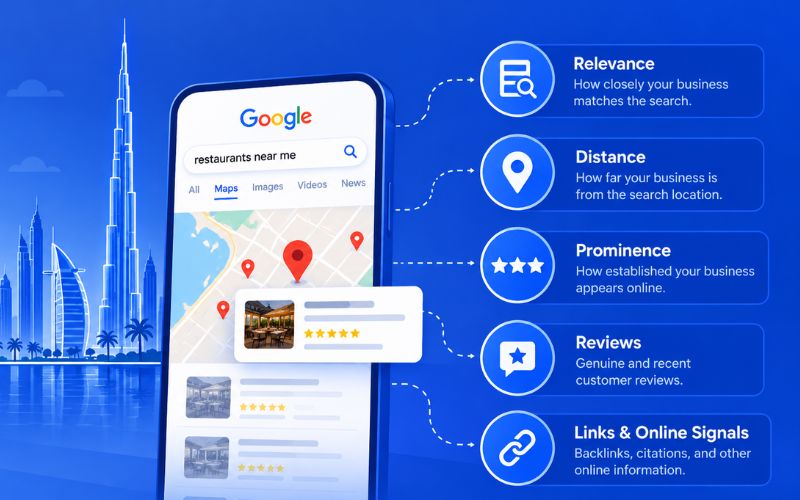
Google does not show every verified business in the same order to everyone. The results can change depending on the search and where the person is searching from. Google mainly looks at how closely the business matches the search, how far away it is, and how established it appears online. Reviews, links, and other information about the business can all play a part in that picture. If the links part is new to you, our guide on the importance of backlinks in SEO explains how they build that trust.
What Are the Main Reasons Your Business Is Not Showing on Google Maps
Reason 1: Your Google Business Profile Isn't Verified
Google uses verification to confirm that the person managing a profile is authorised to represent the business. Until that step is complete, the listing may not appear publicly at all.
To check your Google Business Profile verification status:
- Search your business name on Google while signed in to the account that manages it.
- Look for a "Get verified" prompt on the profile.
- Complete the method Google offers, which may be a video recording, phone call, text, email, or postcard depending on the business.
Reason 2: Your Profile Is Incomplete or Poorly Optimized
A profile with only a business name and phone number does not tell Google or customers very much. Good Google Business Profile optimization is mainly about accuracy and completeness.
Work through the profile and fill in:
- Opening hours, including special hours for Ramadan and public holidays.
- Your services or products, each with a short description.
- A business description that explains what you do and which areas you serve.
- Real photos of your premises, team, and work.
- A website link that leads to the most relevant page, not only the homepage.
Reason 3: Your NAP Is Inconsistent Across the Web
NAP means Name, Address, and Phone number. Suppose your website has your new Dubai address, while an old directory still shows your previous location and another listing has an outdated phone number. These small differences make it harder for Google to trust which details are correct. This is why NAP consistency deserves attention.
To fix it:
- Write down one official version of your name, address, and phone number, matching your trade licence and signage.
- Search your business name and old phone numbers on Google to find outdated listings.
- Update or claim each listing, starting with major directories, social profiles, and map apps.
Reason 4: You've Chosen the Wrong Business Category
Your category tells Google what kind of business you operate, and the primary category carries the most weight. Picking one because it sounds popular does not help if it does not describe your actual service.
Review your Google Business Profile categories this way:
- Set the primary category to your main revenue activity, as specific as possible, for example, "Dental clinic" instead of "Medical clinic".
- Add additional categories only for services you really offer.
- Look at which categories the top three competitors use for your main search and compare them with yours.
Reason 5: Your Address Doesn’t Meet Google’s Guidelines
Google expects the address on your profile to reflect how and where you actually serve customers.
Check which setup applies to you:
- Customers visit your premises: make sure the address and map pin point to the actual location, including the building name, floor, and unit number.
- You travel to customers: you may qualify as a service area business, which means hiding the street address and listing the areas you genuinely serve.
- You work from a shared office or business centre: Google accepts it only when the business has its own signage and staff present during the stated hours.
Reason 6: Too Few or Outdated Reviews
Google looks at review count, rating, and recency when it assesses local prominence. A profile with five reviews from two years ago will struggle against a competitor that receives new reviews every month.
Build a simple habit:
- Copy the review link or QR code from your profile and share it by WhatsApp or email after each completed job.
- Ask in person at the moment the customer is happy.
- Reply to every review, positive or negative.
Reason 7: Your Business Is Too Far From the Searcher
Google uses the distance between the searcher and the business, so a company in Al Quoz will not always appear for someone searching in Deira.
What to do:
- Search from different areas, or ask customers in other parts of the city to search, and look for patterns.
- If your business consistently appears around its actual location, the profile is working, and the limit is distance.
- Add service pages and customer examples on your website for the areas you actually cover.
Reason 8: Your Website Sends Conflicting Local Signals
Google reads your website to confirm what your profile says. If the profile lists one address but your contact page shows another, or the site still displays an old phone number or discontinued services, update it. A good local SEO strategy for Dubai businesses connects the website and the Business Profile instead of treating them as separate projects.
Check that:
- The name, address, and phone number in your footer and contact page match the profile exactly.
- Each main service has its own page.
- The site loads properly on mobile and can be crawled, which is where technical SEO comes in.
Reason 9: Your Profile Has Been Suspended
If the listing was showing earlier and has suddenly disappeared, sign in and check whether your Google Business Profile is suspended or disabled. Google also sends an email to the profile owner when this happens. A suspension usually means Google found a guideline or eligibility issue.
To recover:
- Read the reason Google gives and compare your profile against its guidelines.
- Correct the problem first, for example, a keyword-filled business name or an ineligible address.
- Submit an appeal through Google's appeals tool with proof such as your trade licence, a utility bill or tenancy contract, and photos of your signage.
Reason 10: You're Not Active Enough on Your Profile
You do not have to post every day to maintain a Business Profile. However, outdated information can make the listing less useful. Think of it as maintaining your shop window; if something has changed in the real business, the information online should change too.
Check these from time to time:
- Opening hours and holiday timings.
- Services and other customer-facing details.
- Photos of your premises and work.
- New reviews that need a reply.
Your Google Maps Recovery Checklist
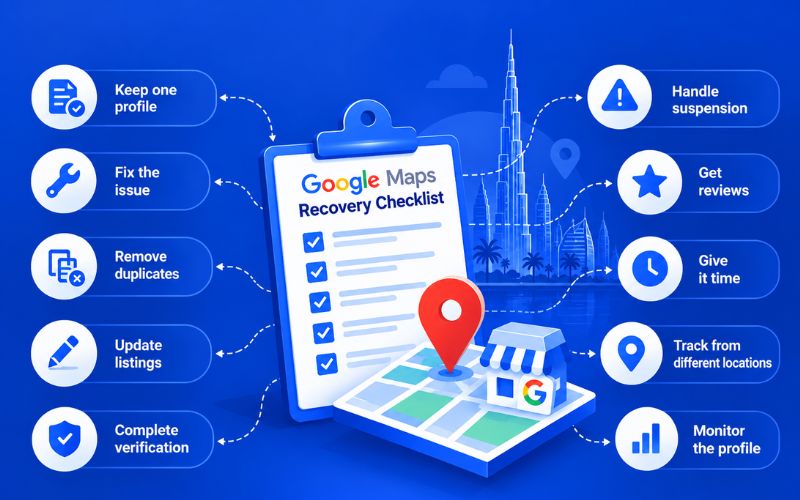
| Sr.No | Checklist Item | What to Do |
|---|---|---|
| 1 | Keep one profile | Stick with the listing you already have. |
| 2 | Fix the actual issue | Deal with the reason your visibility has dropped. |
| 3 | Remove duplicates | Look for other listings created for the same business. |
| 4 | Update external listings | Change old business details on important websites. |
| 5 | Complete pending verification | Finish any verification Google has left pending. |
| 6 | Handle suspension first | Sort out the suspension before working on rankings. |
| 7 | Request genuine reviews | Reach out to customers and ask for honest feedback. |
| 8 | Give changes time | Recent updates will not show up straight away. |
| 9 | Track from different locations | Track how the listing is appearing across your service area. |
| 10 | Monitor the profile | Keep checking for new issues after the changes. |
Dubai-Specific Local SEO Tips
Dubai has a large and competitive local search market, and businesses often serve several nearby areas. That does not mean you should list every neighbourhood as a service area. Keep the information realistic and connected to where you actually operate.
Physical businesses should make sure their address and map location are accurate. Businesses that travel to customers should use the appropriate service-area setup. It is also worth checking old directory listings. Previous addresses and phone numbers can remain online long after a business has moved.
How to Rank Higher in the Local Pack Once You're Visible
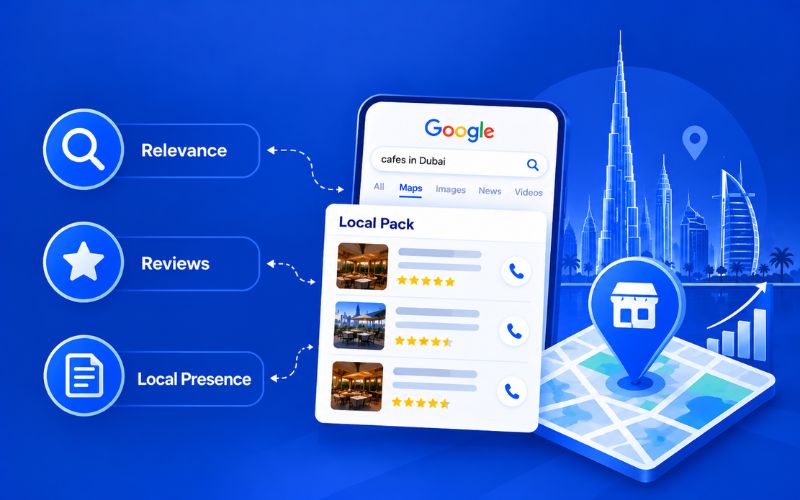
Once the listing appears, the next concern is how to rank on Google Maps for searches that matter to your business.
Start with relevance; your category, services, website, and profile information should describe the same business.
Then work on prominence through genuine reviews, useful website content, relevant local mentions, and a trustworthy online presence.
The Google Local 3-Pack is highly visible, but there is no legitimate setting that guarantees a place in it. Focus on building a strong local presence rather than looking for a quick ranking trick.
When to Get Professional Help
If you have checked your verification, categories, location, website, reviews, and suspension status but still cannot find the issue, a local SEO audit can help. A Google Maps SEO audit for a Dubai business reviews the profile, website, citations, reviews, and competitors together to identify what is holding the listing back. With professional SEO services Dubai businesses can get these issues diagnosed and fixed without trial and error.
Frequently Asked Questions
How long does it take for a new business to appear on Google Maps in Dubai?
There is no set amount of time for a business to start appearing in local results. Verification can take a little while, and competitive searches may take longer before your listing gains visibility.
Can I rank on Google Maps without a physical office or storefront in Dubai?
Yes. Eligible businesses that travel to customers can use a service-area setup instead of showing a customer-facing address. The business must still meet Google's requirements.
Does my website affect my Google Maps ranking?
Your website can help Google understand your business. Keep your business name, services, location, phone number, and other important details consistent with your profile.
What is a Google Business Profile suspension and how do I fix it?
A suspension means Google has restricted the profile because of a possible guideline or eligibility issue. Review the reason, solve the problem, and use the official appeal process where applicable.
Does a Makani number affect my Google Maps ranking in Dubai?
A Makani number makes it easier to identify an address in Dubai, but it is not something Google lists as a ranking factor, so adding one to your profile will not automatically improve your position on Maps.
Conclusion
If your business has stopped appearing in local search, there is no need to panic or start over with a new listing. First, look at the profile itself. Check the verification, business details, category, location, reviews, website, and any suspension notices. It is also worth checking whether the problem occurs for every search or only in certain areas.
Once you know where the problem lies, resolve that first. Keep your information accurate across the web and give Google some time to pick up the changes. A properly maintained profile is a far better starting point than constantly changing keywords or creating new listings.
At AONE SEO Service, we help Dubai businesses find out exactly why a listing is not showing and fix it properly, from Google Business Profile audits and citation cleanup to review strategy and website alignment. As an SEO agency Dubai businesses trust for local visibility, we look at your profile, website, and local signals together so your business appears where your customers are searching. Contact us today to discuss your Google Maps visibility. Call us on +971585641811 or email us at info@aoneseoservice.ae.
Contact us today to discuss your SEO requirements. Call us on +971585641811 or email us at info@aoneseoservice.ae.