

Table of Contents
Even a 1-second delay in your website’s loading time can make a visitor lose interest, according to Google. Page Speed is a highly competitive factor in the SEO (Search Engine Optimization) world. It’s more than just a statistic; website speed can be the difference between a sale and a loss.
Optimizing the speed of your website is not an option but a necessity in the modern SEO landscape. Faster page loading speeds improve user experience, reduce bounce rates, and improve search engine rankings.
It is crucial that, as a business owner with a website, whether just a landing page or a full-fledged e-commerce store, you understand the importance of page speed for SEO. In the following blog post, we are going to go through page speed in detail. We will explain page speed and its importance in detail, along with the tools to measure website loading speed and tips to improve it. Let’s get started.
What is Page Speed?
Page Speed plays a very important part in a website’s performance and impacts the overall user experience as well as the search engine rankings of the website. It is measured using the PageSpeed Insights (PSI) metric. PSI reflects how quickly the primary content of your webpage becomes visible to a visitor. A higher PSI score generally indicates better performance, which can positively influence your website’s search engine rankings.
A visitor expects a seamless experience whenever they visit a website, meaning they want to completely experience the website as soon as they click on its URL. If your website fails to meet the visitor’s page load time standards, they will quickly leave your website and switch to a competitor’s website.
Page speed is a crucial part of technical SEO. You can also explore more about technical SEO in detail here: What is Technical SEO and Why is it Important?
How is Page Speed Measured?
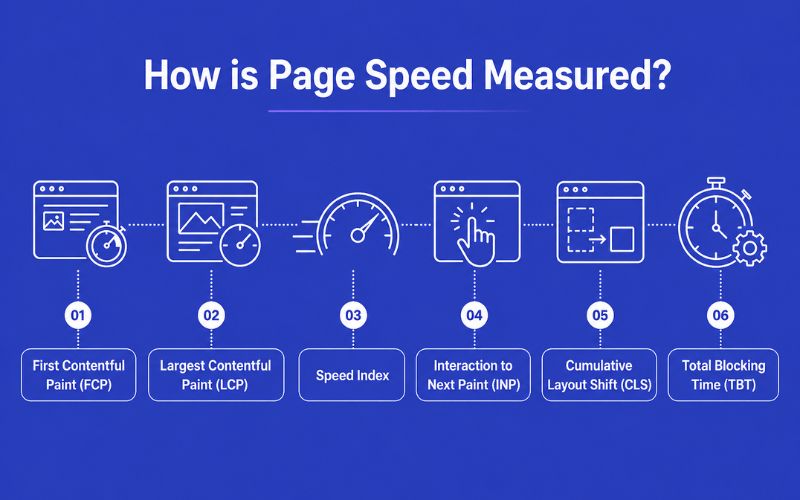
The loading speed of a webpage is measured using advanced metrics along with basic metrics like Time to First Byte (TTFB) and Page Load Time. A proper page speed test helps evaluate these metrics accurately. Here are advanced metrics that are used to measure the page speed of a website.
First Contentful Paint (FCP):
FCP marks the moment the first element of content appears on the screen.
Largest Contentful Paint (LCP):
The LCP focuses on the time taken by the largest element of content to appear on the screen.
Cumulative Layout Shift (CLS):
CLS measures the visual stability of a page. It ensures that elements like text, buttons, or images do not shift unexpectedly while the page is loading, which can cause frustrating accidental clicks.
Speed Index:
It evaluates how quickly the content of a webpage is visible to the visitor.
Interaction to Next Paint (INP):
INP assesses a page's overall responsiveness to user interactions, replacing deprecated metrics like TTI to ensure immediate visual feedback when a user clicks or taps.
Total Blocking Time (TBT):
It calculates the total duration when a webpage is unable to respond to user actions.
The following are some of the best page speed tools that you can use to check your webpage speed:
- WebPageTest: Along with measuring how quickly a page loads, it also provides a detailed view of each stage in the loading process.
- GTmetrix: Apart from highlighting the areas of improvement, it also recommends solutions to fix your website’s performance.
- Google Lighthouse: It is mainly used by developers to get detailed reports on multiple things, like performance, accessibility, and SEO.
- Google PageSpeed Insights: It evaluates various aspects of your website (back-end and front-end) and provides a score between 0 and 100. For the best Google PageSpeed Insights tips, focus on the specific diagnostic warnings it provides to prioritize your technical fixes.
How does page speed affect SEO?
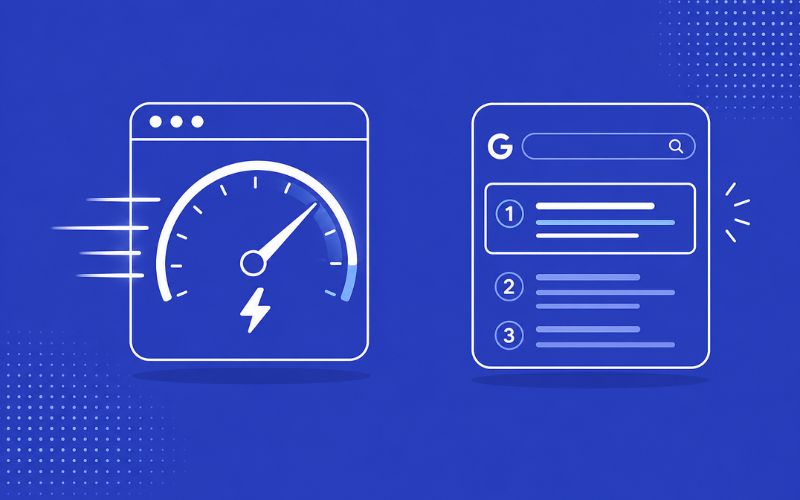
Page speed has a significant impact on the SEO performance of a website. The Google search engine uses a website’s speed as a factor during ranking. Websites with faster load times generally rank higher in Google’s SERPs (Search Engine Results Page). On the other hand, websites with poor loading speed rank very low and have less visibility.
A faster loading speed not only improves your website’s ranking but also improves the overall user experience. Lower bounce rates indicate better credibility, and better credibility means the search engine will rank you even higher.
Furthermore, with the dominance of AI search models and Generative Engine Optimization (GEO) in 2026, having an instantly accessible, fast-rendering site architecture is mandatory. AI agents crawl and parse data rapidly; if your server response time or DOM rendering is too slow, AI models may skip your content entirely when compiling automated responses.
Here are some tips to speed up web pages:
Strategy 1: Comprehensive Asset Optimization
Images and videos have become an integral part of modern websites, but they are known to take up a lot of space and, as a result, impact loading times. Optimizing images and videos is a good practice for any website developer. Consider compressing your images without compromising their quality. There are several image compression tools and plugins available online that can reduce image file sizes without significantly degrading their quality. Also, some correct image dimensions might prevent the browser from resizing them, which can reduce page load time.
Consider hosting videos on external platforms like YouTube or Vimeo and embedding them on your webpage. YouTube and Vimeo have an optimized streaming system, which will reduce the load on your website and improve loading speeds significantly.
Make sure to regularly monitor your website using tools like Google PageSpeed Insights to check how optimized the media content on your website is. Track performance trends and compare mobile vs desktop performance as well.
Strategy 2: Streamlining Code and Minimizing Requests
One of the best ways to reduce page load time is to streamline your website code. Every time a user’s browser makes an HTTP request, it adds overhead and can lead to slower loading speeds. It is crucial to minimize the number of HTTP requests if you want faster loading speeds.
To do this, you need to minify CSS and JavaScript files and combine them into a single file. You must also remove any unnecessary images, JavaScript files, stylesheets, and fonts. Remove plugins that are not useful from WordPress because they can sometimes load additional files on your webpage.
You should try to minimize the use of redirects as much as you can because they can add extra time for the browser to process the webpage. Review your code to remove useless redirects to improve your website’s average page load time and the overall user experience.
Strategy 3: Optimizing Server-Side Performance and Caching
Caching means storing a version of some files of a website in a temporary location. Accessing cache files leads to faster loading speeds, reduced latency, and less load on the server. To take advantage of caching, you should set appropriate cache headers for those resources that do not change that often, such as images, CSS files, and JavaScript files.
By setting caching duration for static elements of your website, you can minimise the number of requests sent to the server significantly, improving the overall performance of your website. Using website caching is one of the most efficient practices to maximise the performance, effectiveness, and user experience of your website as a whole.
Strategy 4: Leveraging Global Content Delivery Networks (CDNs)
CDNs are servers that are located across multiple locations worldwide. They store the cached copies of the static elements of your website. The latency can be high if a user accesses your website from a far location. CDNs solve this issue. They optimize the delivery of static files like CSS, images, fonts, and JavaScript to users efficiently and quickly.
As CDNs are located around the globe, load times are reduced regardless of where the user is located. The user’s browser will send a request to the nearest CDN. As a result, it will reduce server response time and increase loading speeds.
Using a CDN to deliver the content of your website is a smart way to improve the loading speeds as well as the SEO performance of your website.
Strategy 5: Simplifying Site Architecture
Plugins are commonly used in content management systems like WordPress to add extra functionalities to the website, such as analytics or a comments feature. However, plugins will almost always load additional CSS and JavaScript files on your website. Some may even increase the TTFB (Time To First Byte) time of your website because they go through additional processing on the server on each request. Thus, it is better to go through your plugin list and review each to make sure you really need it.
It is also very important to regularly optimize your database. What this means is cleaning up old post revisions, spam comments, transients, and useless tables. Use indexing strategies to speed up queries and use caching layers to reduce workload on the database. All of this will lead to a significant improvement in your website's loading speed.
Page speed also affects how search engines crawl your website. Learn more about how search engines crawl websites.
Conclusion:
Optimizing your website's loading speed can feel overwhelming if you don't have a clear roadmap for fixing technical bottlenecks. Remember, these optimizations are not a "set it and forget it" task. You need to regularly monitor performance and adapt to provide a seamless user experience and maintain high SEO value.
If this process feels complex or time-consuming, partnering with AONE SEO Service Dubai can make it effortless. As the best SEO company in Dubai, our experienced team can help you dramatically improve your website speed, optimize your technical performance, and achieve higher search engine rankings through proven 2026 strategies.
Ready to accelerate your website and boost your conversions, contact us today.
FAQs
1. Does page speed impact mobile SEO differently than desktop SEO?
Yes, page speed has a stronger impact on mobile SEO because most users browse on mobile devices. Search engines like Google use mobile-first indexing. Slow mobile pages can significantly hurt visibility and engagement.
2. What is a good page load time for SEO?
Ideally, a webpage should load within 2 to 3 seconds. Anything beyond that increases bounce rates and negatively affects user experience. For best SEO performance, aim for under 2 seconds, especially for mobile users.
3. Can hosting quality affect page speed?
Absolutely. Your web hosting provider directly impacts server response time. Poor hosting can slow down your website regardless of optimizations. Upgrading to faster hosting (like VPS or dedicated servers) can significantly improve speed and stability.
4. How does page speed affect conversion rates?
Even a slight delay can reduce user trust and cause visitors to abandon actions like purchases or sign-ups. A fast-loading site creates a smoother journey, increasing the chances of conversions.
5. How does lazy loading images affect SEO?
Lazy loading is a technique where images or videos load only when they are about to appear on the user’s screen. This reduces initial load time and is a highly recommended lazy loading images SEO best practice.