


Table of Content
- What is Robots.txt?
- What Should a Robots.txt Contain?
- Is Robots.txt Important? (Importance of Robots.txt in SEO)
- How to Create a Robots.txt file?
- Best Practices for Robots.txt
- Some Examples of Robots.txt
- Common Mistakes To Avoid in Robots.txt
- How Important is Sitemap for SEO?
- Best Practices for XML Sitemaps
- Sitemap XML Example
- Are You Making These 5 Costly Mistakes in Your XML Sitemap?
- AI & SEO: How Robots.txt/Sitemaps Will Evolve
- Final Thoughts
- FAQs
In the ever-evolving digital world, ensuring your website is discoverable and efficiently indexed by search engines is paramount
The two fundamental tools that significantly influence your site's visibility and search engine optimization (SEO) are the robots.txt file and XML sitemaps.
The robots.txt file is a directive for search engine crawlers, guiding them on which pages to crawl or avoid, thereby optimizing the crawling process. Conversely, XML sitemaps provide a comprehensive list of your site's pages, facilitating search engines in discovering and indexing content.
Understanding and implementing these tools effectively can profoundly impact your website's performance. According to a report by BrightEdge, over 53% of overall website traffic for businesses comes from organic search, underscoring the critical role of SEO in gaining web traffic.
By leveraging the robots.txt file and XML sitemaps, you can enhance your site's SEO strategy, ensuring that search engines efficiently crawl and index your content, ultimately improving your site's visibility and search engine rankings.
So, if you want to know everything about Robots.txt and XML sitemaps, keep reading this blog till the end.
Let's get started.
What is Robots.txt?

The robots.txt file serves as a critical crawl directive, guiding search engine bots on how to navigate websites structurally by following precise syntax. Its primary purpose is to inform search engines about the URLs that are permissible for indexing on your site.
Incorporating a robots.txt file is essential for businesses, as it is the first element search engine bots seek upon entering your website. Even if your goal is to allow bots to access all your site pages, a default robots.txt file is crucial to ensure they crawl in a way that aligns with your SEO strategy and maximizes your website's performance.
What Should a Robots.txt Contain?
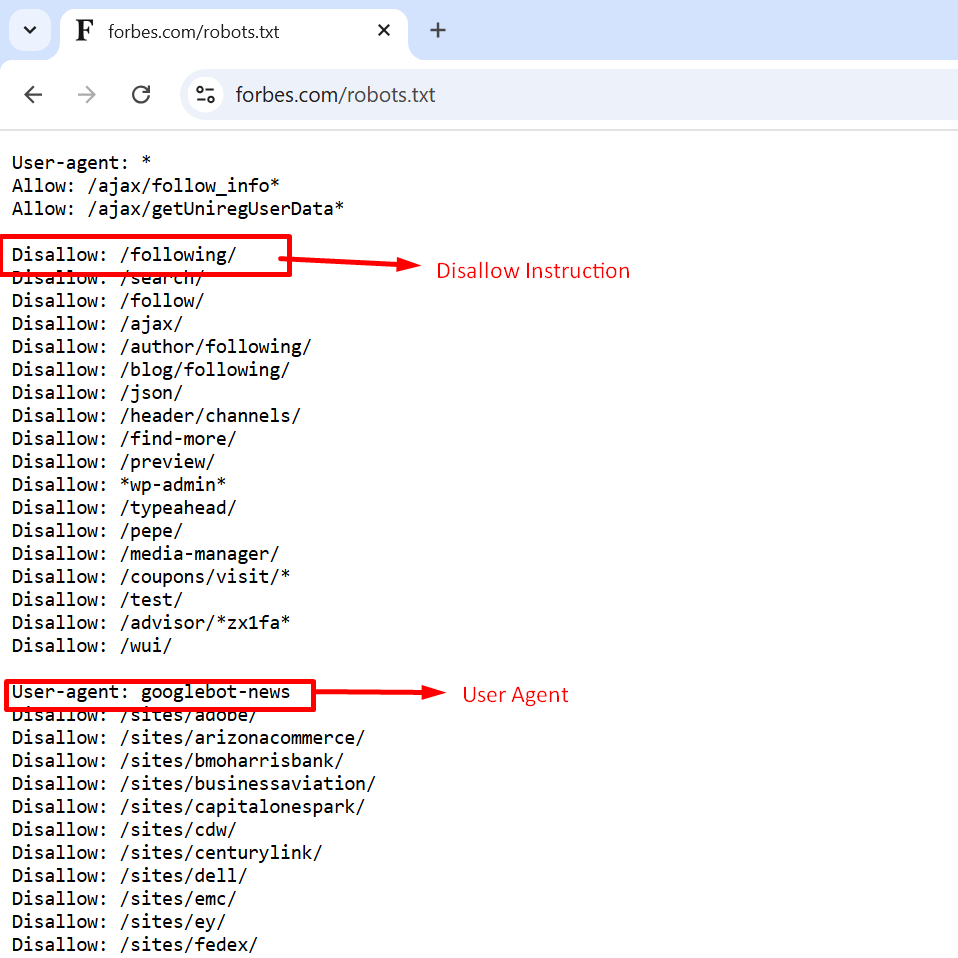
A well-structured robots.txt file is the key to guiding search engine crawlers effectively. Here's what it should typically include:
User-Agent Directive
Specifies which search engine bots (Googlebot) the rules apply to. You can set rules for specific bots or all bots using user-agent: *.
Allow and Disallow Directives
These define which pages or directories bots can or cannot crawl. For instance:
- Disallow: /private/ prevents bots from crawling the "private" directory.
- Allow: /public/ permits access to specific sections.
Sitemap URL
Including the location of your XML sitemap in the robots.txt file ensures that bots can find and index all important pages. For instance:
- Sitemap: https://www.abc.com/sitemap.XML
Crawl-Delay Directive
The crawl-delay directive instructs crawlers to wait a specified number of seconds between requests, helping to prevent server overload.
However, it is important to note that Google no longer supports the crawl-delay directive. To manage crawl rates for Googlebot, you can use the Google Search Console instead.
Noindex Directive
A robots.txt file guides search engines on which areas of your site to crawl or avoid but cannot reliably prevent a URL from appearing in search results, even when a noindex directive is applied.
If you include a noindex directive in robots.txt, the page may still appear in search results, although it may not display its content.
Is Robots.txt Important?
As previously highlighted, robots.txt is essential for SEO as it regulates web crawler activities, preventing them from overloading your website and accessing pages not meant for public visibility.
Here's how robots.txt is beneficial in SEO:
Optimize Crawl Budget
While understanding on page vs technical SEO is crucial for overall optimization, robots.txt plays a particularly important role in the technical aspect. With the help of robots.txt, you can block unnecessary pages so that Google's web crawler allocates more of its crawl budget: the number of pages Google crawls on your site within a given timeframe to the pages that truly matter.
Crawl budget varies depending on factors such as your website's size, overall health, and the number of backlinks it has. Google has shared best practices for managing your website’s crawl budget.
Essential pages may not be indexed if your website has more pages than its allocated crawl budget. Without indexing, these pages cannot rank in search results, rendering your efforts to create them ineffective, as users won't see them.
Restrict Access to Duplicate and Non-Public Pages
A robots.txt file helps exclude non-public pages from search engine results, such as staging sites, internal search results, duplicate pages, or login pages.
Many CMS platforms, including WordPress, automatically handle these, blocking pages like "/wp-admin/" for web crawlers.
Hide Resources
Lastly, robots.txt can help you prevent resources like PDFs, videos, and images from being crawled, ensuring privacy or directing Google to prioritize more important content.
How to Create a Robots.txt file?
If you don't have a robots.txt file, you can create it by following the steps below:
Create the File
Firstly, open a text editor like Notepad or TextEdit, create a new file, and save it as "robots.txt" with a '.txt' extension. Make sure this File is saved in a text-delimited format.
Upload to Root Directory
Then, place the File in the root directory of your website, typically located in a folder like “htdocs” or “www," so it appears directly after your domain name.
Sub-Domain Files
After that, create a separate robots.txt file for each subdomain if your website uses them.
Test the File
at last, verify the robots.txt setup by entering the domain URL in a browser to ensure it loads correctly.
Best Practices for Robots.txt
Place Each Directive on a Separate Line
Write each directive on a separate line to ensure search engines can easily read and follow the instructions.
List Each User-Agent Only Once
Include each user-agent only once to maintain organization and minimize the chances of errors.
Utilize Wildcards to Simplify Instructions
Use wildcards (*) to apply directives more broadly. Instead of listing each URL with parameters individually, you can simplify the process by using wildcards to cover them all.
Use '$' to Indicate the End of a URL
To prevent search engines from crawling all files of a specific type, using "$" allows you to avoid listing each File individually.
Use Hash Symbol to Add Comments
Add comments starting with a (#) symbol, as crawlers pass over anything that begins with a hash.
Some Examples of Robots.txt
Here are some examples of robots.txt of well-known websites.
Forbes
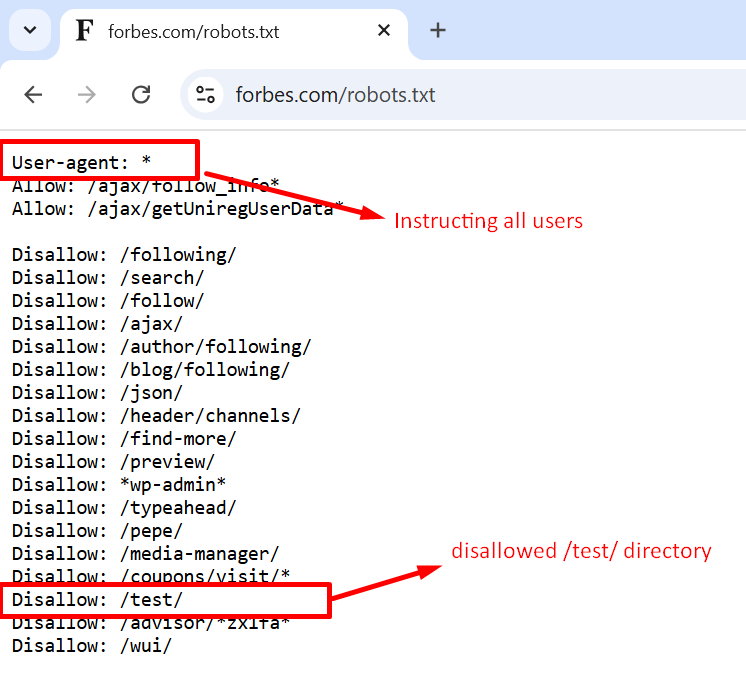
First on the list is Forbes, whose robots.txt directs all crawlers to avoid crawling the "/test/" directory, which likely contains testing or staging environments.
The directives in Forbes' robot.txt file ensure that incomplete or sensitive content is not indexed, provided it isn't linked to other pages.
Nike

Nike's robot.txt file employs the disallow directive to prevent crawlers from accessing user-specific directories such as "/checkout/" and "*/member/inbox."
These rules help Nike safeguard their customers' sensitive data from appearing in search results and minimizing the risk of SEO manipulation.
Search Engine Land

Search Engine Land's robot.txt file uses the disallow directive to prevent the indexing of pages in the "/tag/" directory, which often have low SEO values and can lead to duplicate content problems.
These rules guide search engines to prioritize high-quality content and optimize the site's crawl budget, an essential strategy for websites like Search Engine Land.
Common Mistakes To Avoid in Robots.txt
Be mindful of these common mistakes when creating your robots.txt file:Failing to Include the Robots.txt File in the Root Directory
Your robots.txt file must be in the root directory, such as "www.xyz.com/robots.txt," for search engines to locate it easily.
Placing it in a subdirectory, like " www.xyz.com/contact/robots.txt", could prevent search engines from finding it and assuming no crawling instructions are set.
Using Noindex Instructions in Robots.txt
Avoid using noindex directives in the robots.txt file, as Google does not support this rule.
Instead, control indexing by applying meta robot tags to individual pages.
Failing to Block Access to Unfinished Pages or Site Sections
Prevent search engines from crawling unfinished versions of your site to avoid premature exposure (also use a meta robots noindex tag for each in-progress page).
Crawling and indexing incomplete pages can lead to a poor user experience and duplicate content issues.
Use robots.txt to keep unfinished content private until your site is ready to launch.
Blocking JavaScript and CSS
Refrain from blocking JavaScript and CSS files in robots.txt unless necessary, as it can hinder search engines from understanding your site's structure, negatively affecting your rankings.
Using Whole URLs
Use relative URLs in your robots.txt file for easier management and maintenance.
Complete URLs are unnecessary and may lead to errors if your domain changes.
An XML sitemap is a document created for search engines that lists all pages on a website, providing details about content, updates, and page importance.
Unlike user-friendly HTML sitemaps, XML sitemaps help search engines quickly discover new content and understand the site's structure.
How Important is Sitemap for SEO?
When it comes to SEO, XML sitemaps play an important role as it ensures search engines can easily discover and index your website's pages. This highlights the importance of technical SEO in optimizing your site's crawlability and indexation. It provides a clear structure for your site, helping search engines understand the content hierarchy and importance. Sitemaps also speed up the discovery of new or updated content, improving visibility in search results.
For large or complex websites, they are indispensable in ensuring no important page is overlooked.
Best Practices for XML Sitemaps
It's crucial to follow these best practices when implementing XML sitemaps.
Keep XML Sitemaps Updated
Ensure your XML sitemap accurately reflects your website's current structure. Remove any pages from the sitemap when they are deleted, and if using the optional lastmod tag, update the timestamp whenever a page is modified.
Include the Indexable Pages Only
Your XML sitemap should only include indexable pages, excluding URLs for redirects and missing pages. Ensure pages are accessible to search engines and not blocked by robotos.txt or directives like meta robots, canonical links, or x-robots-tag.
Include a Reference to the XML Sitemap in your Robots.txt File
If your XML sitemap or sitemap index URL deviates from the standard, reference it in your robots.txt file. Even with a standard URL, adding it to robots.txt is recommended to improve search engine discoverability.
Keep the Default Location and Filename
Try to use the default location and filenames for your XML sitemap (/sitemap.xml) and sitemap index (/sitemap_index.html) whenever possible to make it easier for search engines to locate them.
How to Create a Sitemap in XML
To create a sitemap in XML, you can either start by using your platform's built-in feature, if available or use a sitemap generator tool. Once created, ensure the sitemap is published on your website for search engines to discover.
Sitemap XML Example
Here is an example of www.thedubaimall.com XML sitemap:
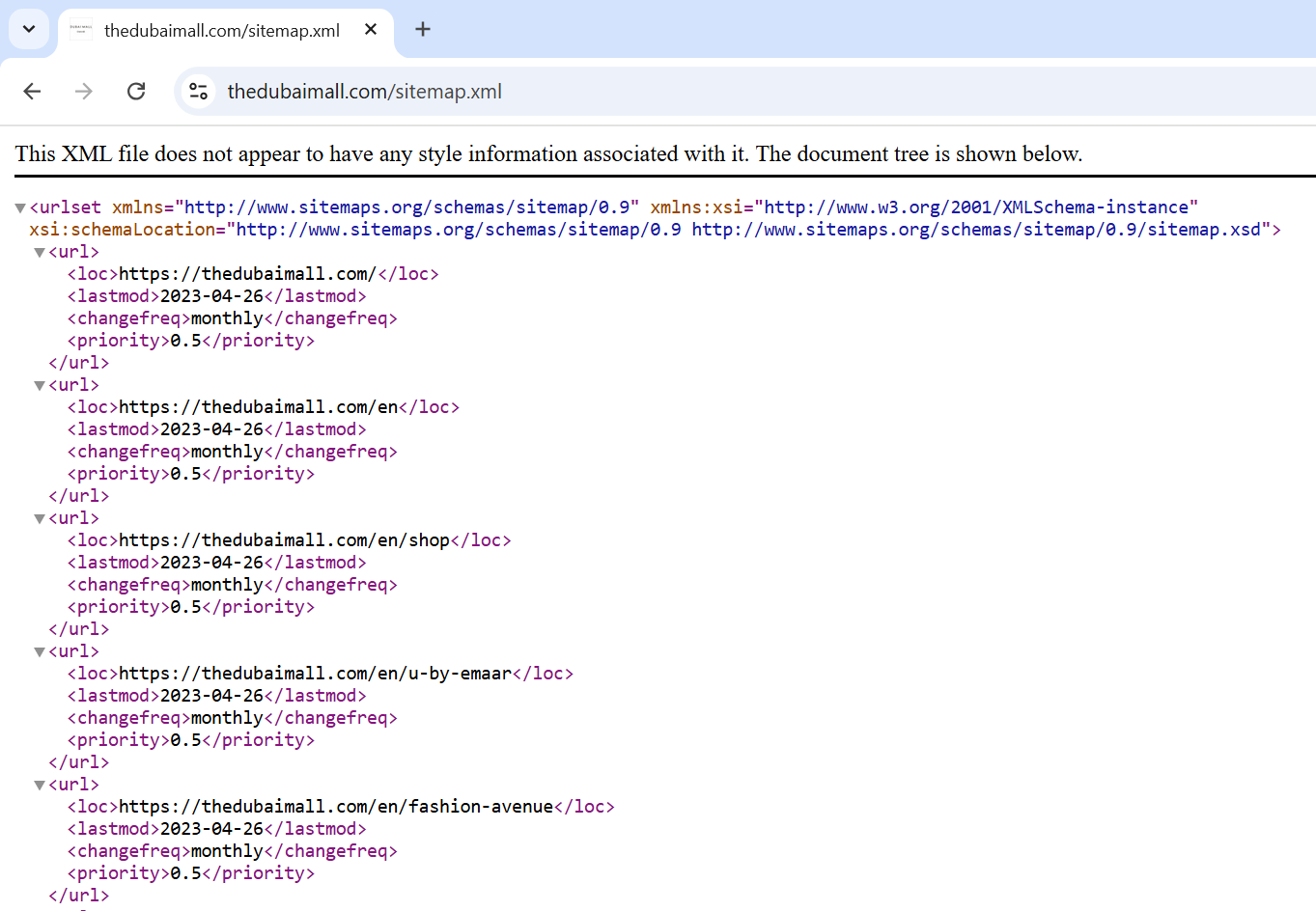
TheDubaiMall.com site has a properly formatted sitemap. Which is beneficial as it ensures that search engines can discover and index all relevant pages of the website, which is a good SEO practice.
Are You Making These 5 Costly Mistakes in Your XML Sitemap?
Some common XML sitemap mistakes that you should avoid:Outdated URLs
Always update your sitemap to remove deleted or redirected pages.
Including Non-Indexable Pages
Avoid adding URLs that are blocked by robots.txt or marked with noindex tags. Ensure only indexable pages are listed.
Incorrect Sitemap Format
Ensure your XML sitemap follows the correct structure, with valid tags and proper syntax to avoid errors.
Missing Sitemap Reference in Robots.txt
Always reference your sitemap in the robots.txt file to ensure search engines can easily discover it.
Not Submitting the Sitemap
After creating the sitemap, submit it to search engines through tools like Google Search Console for better visibility.
AI & SEO: How Robots.txt/Sitemaps Will Evolve
AI models like ChatGPT, Gemini and others rely on web scraping to gather training data. While this can benefit your site’s visibility, it also raises concerns about content ownership and bandwidth usage.
What This Means for Robots.txt
Blocking AI Scrapers:
If you don’t want your content used for AI training, you can block specific AI bots in your robots.txt file.
Example:
User-agent: GPTBot
Disallow: /
Note: OpenAI’s GPTBot, for instance, allows you to opt out of data scraping.
What This Means for Sitemaps
Protecting Sensitive Content: Ensure your sitemap doesn’t include pages with sensitive or proprietary information that could be scraped by AI tools.
Final Thoughts
53% of your website’s organic traffic hinges on these 2 files—robots.txt and XML sitemaps.
But here’s what most businesses miss:
- 87% of crawl budget waste comes from misconfigured robots.txt files.
- Sites with optimized XML sitemaps get indexed 2.3x faster than those without.
Want us to handle this for you? AONE SEO Service Dubai provides the best SEO services in Dubai. We turn technical SEO into a traffic-generating machine.
Contact Us today and let’s turn your website into a Google magnet:
FAQs
What does a robots.txt file do?
A robots.txt file provides instructions to search engine crawlers on which pages of your website to crawl or avoid. It helps manage crawling activities, prevent server overload, and control which content is indexed by search engines, improving SEO and site performance.
What does blocked by robots.txt mean?
Blocked by robots.txt means that a website's robot.txt file is instructing search engine crawlers not to access specific pages or sections of the site.
What does disallow mean in robots.txt?
In a robots.txt file, the 'disallow' directive tells search engine crawlers which pages or sections of a website they are not permitted to crawl or index.
What is the use of XML sitemap?
An XML sitemap allows search engines to discover and index your website's pages more efficiently. It provides a structured list of all the important pages on your site, helping search engines understand the content and hierarchy and ensuring that new or updated pages are quickly indexed and found.
Can I use robots.txt to block AI scrapers like ChatGPT?
Robots.txt can help, but it's not foolproof against AI scrapers. While you can add specific user agents to block, many AI tools don't respect robots.txt protocol. Your best bet is implementing additional security measures like IP blocking and rate limiting.
How do XML sitemaps affect voice search optimization?
Most people don't know that XML sitemaps are secretly powerful for voice search. They help voice assistants quickly find and understand your content structure, especially FAQs and long-tail content that matches natural language queries.
This means better chances of getting featured in voice results.