

Table of Contents
- What is an SEO-Friendly URL?
- Why SEO-Friendly URLs Matter
- Tips to Create SEO-Friendly URLs
- Use a Top-Level Domain
- Short and Simple
- Keyword Usage in the URL
- Use of Hyphens for Separation
- Use HTTPS
- Avoid Special Characters
- Use Lowercase Letters Only
- Keep Your SEO URL Structure Logical
- Organizing URLs with Hierarchy
- Using Categories and Subdirectories
- Avoid Using Dates in URLs
- Avoiding Dynamic Parameters
- Conclusion
- FAQs
URL optimization for SEO is one of the most basic steps in optimizing your website. It may seem easy at first, like all you have to do is add a couple of keywords in the URL, right? Not really. It is much more technical than that.
There are several steps involved in making a URL SEO-friendly to ensure higher visibility on the internet. Do not worry, though. In the following blog, we are going to explain everything about creating an SEO-friendly URL.
First, let's start with the basics.
What is an SEO-Friendly URL?
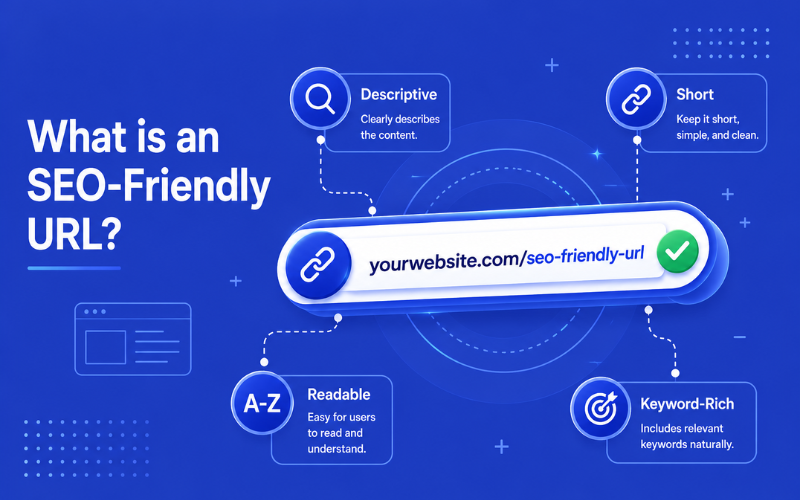
SEO-friendly URLs are designed to help traditional search engines like Google and Bing, as well as modern AI-driven crawlers and Large Language Models (LLMs), understand exactly what the web page is about. The URLs are supposed to be short, descriptive, and often include keywords to increase their visibility in search engines.
Why SEO-Friendly URLs Matter
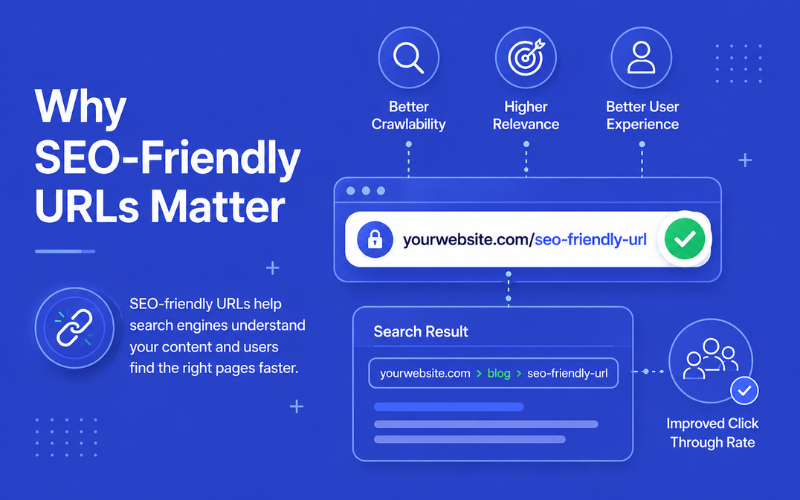
Search engines use the title tag, the link anchor text, the content, and the URL of your webpage to determine what your webpage is about. The Google SEO Starter guide has an entire section dedicated to how search engines use and understand URLs.
Some parts of your URL will also get displayed in SERPs (Search Engine Result Pages) as breadcrumbs. This will allow searchers to determine whether a result answers their queries and helps them or not. Creating a proper URL structure with high-intent keywords is a major part of search engine optimization services.
Tips to Create SEO-Friendly URLs
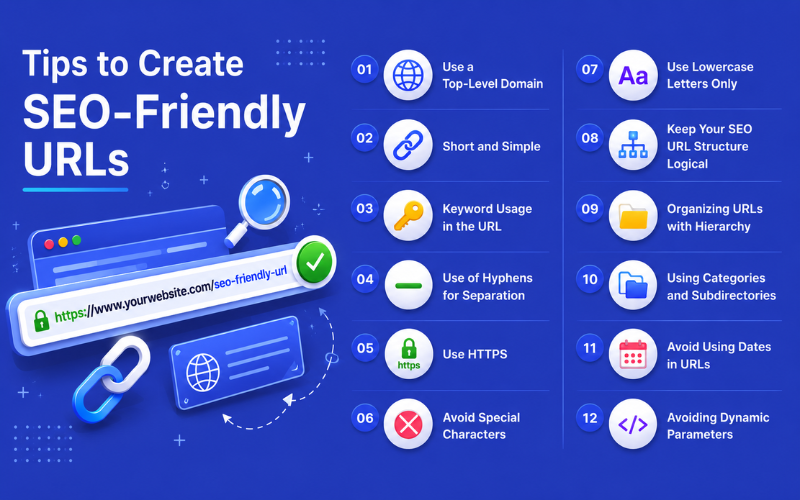
Here are SEO-friendly URL best practices that you should implement to increase the visibility of your webpage on the internet:
Use a Top-Level Domain
If you use a trusted top-level domain (TLD) like .com for your URL, you have a better chance of ranking higher on SERPs and getting more click-through rates. However, for businesses primarily targeting the UAE market, utilizing a country code top-level domain (ccTLD) like .ae is highly recommended to build local trust and explicitly signal regional relevance to search engines. Otherwise, we recommend using ".com" instead of domains like ".biz", ".org", or ".pro".
Many businesses around the world do use other domains instead of ".com", but ".com" still remains the most popular TLD globally. In fact, around 46% of all websites on the internet have a ".com" domain. It may not directly impact your rankings as much as you might think, but it does make users trust your website more.
Short and Simple
The URL of your webpage should be concise and descriptive. Search engines may have difficulty processing overly long and complex URLs. For example, if your webpage is about cricket, it should only have "/cricket" as the extension. Automated URLs can look complex and way too long without any useful information.
The ideal length of a URL must be between 50 and 60 characters only. Beyond that, your URL will be cut off, and users will not be able to figure out what your webpage is about. Keep a thumb rule: if the URL can be shorter, make it shorter.
Keyword Usage in the URL
Your webpage URL must contain at least one keyword in it if you want to rank on SERPs. Try to use the webpage's target keyword in the URL for better results. When Google crawls your URL and finds a keyword, it understands that the webpage is about that keyword.
However, remember not to just stuff your URL with keywords. Using one or two keywords is sufficient. Anything more than that and your URL will start looking suspicious and spammy. Users would lose trust in your URL if you repeat keywords or integrate too many of them.
Use of Hyphens for Separation
If your URL contains more than one word, separate them using hyphens instead of an underscore or joining them. For example, use "/cricket-tips" instead of "/cricket_tips" or "/crickettips". Even here, you can clearly see which one is more likely to get clicks.
Google also recommends using hyphens as word separators. This is because the Google search engine can easily figure out the URL if the words are separated by a hyphen. In some cases, underscores are not decoded properly, which can affect the rankings of the webpage.
Use HTTPS
Today, online protection is very important. There is a significant rise in cybercrimes. Users trust a website more if it uses HTTPS instead of HTTP. HTTPS stands for HyperText Transfer Protocol Secure, which is a secure version of HTTP. HTTPS indicates that the data on the webpage is encrypted.
Using HTTPS is also beneficial for SEO. In 2014, Google announced that websites using HTTPS would have a ranking advantage over websites with the HTTP.
Avoid Special Characters
Some characters are safe to use in the URL, while others are not. Alphanumeric (0-9, a-z, A-Z) are safe to use. Reserved characters like "?" are also acceptable if they are used for their reserved purpose, such as denoting a query string.
Unsafe or special characters should be avoided at all costs. These include blank space, quotations ( " " ), <, >, %, { }, |, \, ^, and ~. Special characters can create issues for browsers, like validation failures, encoding issues, and other technical SEO issues.
Use Lowercase Letters Only
Although letter case does not directly impact your SEO, using uppercase letters can lead to unwanted redirects, 404 errors, and other issues. In the past, Google's John Mueller has said that URLs are indeed case-sensitive, which means it does matter if you use uppercase or lowercase letters in your URLs.
Keep Your SEO URL Structure Logical
It is important that you have an SEO-friendly URL structure to increase your chances of achieving higher ranking. Here is how you get it:
Organizing URLs with Hierarchy
Make sure to have a proper hierarchy in your URLs. It is very important to improve the overall user experience, SEO relevance, and the crawling efficiency of search engine bots. It will also help you manage your content if your website has too many pages.
Proper hierarchy organization will allow breadcrumb navigation and better internal linking, improving SEO effectiveness. Keep the hierarchy as simple and shallow as possible. A complex URL hierarchy can become difficult to read and maintain.
Using Categories and Subdirectories
Using proper categories and subdirectories allows your webpage visitors to know where they are while navigating the page. It also helps Google to understand what content the webmaster thinks is important. Do not use more than two subdirectories, as it can be a bit confusing for the users and also makes your URL longer.
Avoid Using Dates in URLs
Before, CMS like WordPress used to add dates automatically in URLs. Today, it is not a common practice by CMS. Using dates in your URLs is a bad idea. It makes your URL longer, which, as we discussed before, ruins the readability of your URL. Additionally, dates also make it harder to update your content.
Though you can 301 redirect the page to a new URL, not everybody has time to do that, especially if the website has thousands of pages. Hence, we strongly recommend you avoid adding any kind of dates to your URL if you want to keep it SEO-friendly.
Avoiding Dynamic Parameters
Dynamic URL parameters, like UTM tracking, are important, but not everywhere. Dynamic URLs can cause problems for SEO. They can be lengthy and difficult to read, which can be confusing for users, reducing your click-through rates. Also, if different versions of your URL get indexed, there can be duplicate content issues with Google. Thus, avoid dynamic URL parameters to get the best URL structure for SEO.
Conclusion
Creating an SEO-friendly URL may sound technical at first, but following the right practices can make the process much easier. Keep your URLs short, readable, descriptive, and relevant to your webpage content. Using proper keywords, HTTPS, hyphens, and a clean URL structure can improve both user experience and search engine visibility.
If you need professional help improving your website's SEO performance, AONE SEO Service Dubai can help. As a trusted SEO company in Dubai, our team specializes in technical SEO, website optimization, and improving search engine rankings with proven strategies.
Ready to grow your online visibility and drive more traffic to your website? Contact us today and let our SEO experts help your business succeed.
FAQs
1. Is it better to use hyphens or underscores in URLs?
Hyphens are recommended because search engines recognize them as word separators. For example, "seo-friendly-url" is better than "seo_friendly_url."
2. Can poor URL structure create technical SEO issues?
Yes, messy or overly complex URLs can cause crawling, indexing, and duplicate content problems. Many businesses face these technical SEO issues without proper optimization.
3. Are SEO-friendly URLs important for eCommerce websites?
Yes, SEO-friendly URLs are very important for eCommerce websites. They improve product visibility, make navigation easier for users, and help search engines understand product and category pages more effectively.
4. Should dates be included in URLs?
Avoid using dates unless absolutely necessary. Dates can make URLs longer and outdated, especially when content is updated regularly.
5. Static vs Dynamic URLs - What's Better?
Static URLs are generally considered better for SEO because they are cleaner, more readable, and easier for users to understand. Dynamic URLs often contain symbols, parameters, or session IDs, which can sometimes create issues for search engine crawlers. Static URLs usually perform better in terms of crawlability, readability, and overall user experience, making them a preferred choice for SEO-friendly website structures.